Skip to content

DWGSee CAD Support

  • Articles
  • User Guide
DWGSee CAD Support

What's New

6
  • New Features in DWGSee CAD 2027
    • Extract Dim
    • SCRIPT
    • UNION(Command)
    • SUBTRACT (Command)
    • MASSPROP
    • Rename

Get Started

4
  • Command Line List
  • Main Features
  • System Requirements
  • Welcome to DWGSee CAD

Have You Tried?

5
  • Isolate Objects
  • How to use Design Center in DWGSee CAD
  • How to merge lines/arcs to one ployline
  • How to Draw Arrows in DWGSee CAD
  • How to Select Objects Based on Shared Properties?

User Guide

69
  • Manage Drawing Files
    • ISOLATEOBJECTS (Command)
    • UNISOLATEOBJECTS (Command)
    • HIDEOBJECTS (Command)
    • Units
    • Create a new drawing
  • Create Objects
    • BLEND
    • Hatch
    • Ellipse
    • Circle
    • Multiline
    • Spline
    • Point
    • XLINE
    • UNION(Command)
    • SUBTRACT (Command)
    • INTERSECT(Command)
    • Arc
    • Rectangle
    • Polygon
    • Polyline
    • Line
    • Create Text
      • STYLE
    • Create Curved and Closed Geometry
      • About Donuts
        • Donut
      • About Regions
        • Region
    • Create Linear and Reference Geometry
      • TangentLine
  • Reference External Files and Data
    • DWFATTACH
  • Defining Blocks
    • WBLOCK
    • About Purging Unreferenced Layers, Blocks, and Style Definitions
      • PURGE
  • Modify Objects
    • CHAMFER
    • EXTEND
    • TRIM
    • Pedit
    • Mledit
    • Fillet
    • Copy
    • Scale
    • Array
    • Mirror
    • PURGE
    • Duplicate and Array Objects
      • Offset
      • About Copying Objects
        • NCOPY(Command)
    • Remove Objects and Object Segments
      • Erase
      • Break
      • Join
      • About Correcting Mistakes
        • Overkill
        • OOPS
    • Change General Object Properties
      • Linetype
      • Layer
      • How to Change the Color of Selected Objects?
      • LIST
      • About Object Properties
        • MATCHPROP
    • Editing Complex Objects
      • EDITTOL
      • EXPLODE
    • Change the Size and Length of Objects
      • Lengthen
      • EXTEND
      • TRIM
    • Move and Rotate Objects
      • Align
      • Rotate
      • Stretch
      • Move
  • Control Drawing Views
    • REGEN
    • ZOOM
    • PAN
  • Control Precision with Drafting Aids
    • LIMITS (Command)
  • Add Hatches, Fills, Tables, and Revision Clouds
    • Wipeout
  • Create Notes, Labels, and Leaders
    • Extract Dim
    • ANNOALLVISIBLE (System Variable)
  • Dimension Objects
    • TOLERANCE
    • CenterLine

License

1
  • End-User License Agreement
View Categories
  • DWGSee CAD
  • Support
  • User Guide
  • Modify Objects
  • Change the Size and Length of Objects
  • EXTEND

EXTEND

Extends objects to meet the edges of other objects.

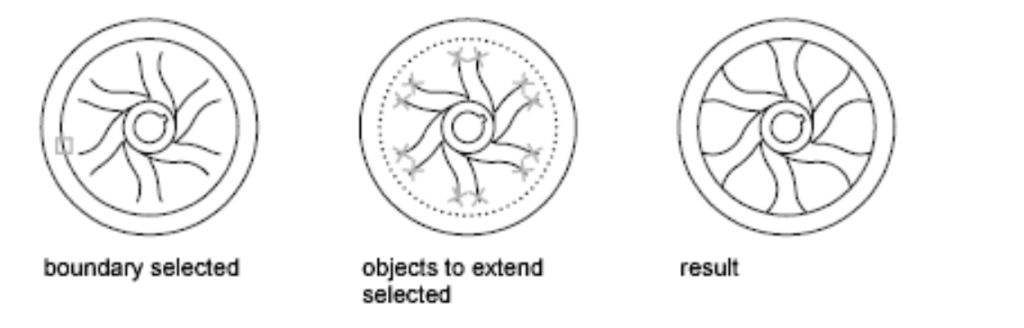
You can extend objects so that they end precisely at boundary edges defined by other objects. In this example, you extend the lines precisely to a circle, which is the boundary edge.

Command line enter: EXTEND or EX
Command Line, EXTEND
Share This Article :
  • Facebook
  • X
  • LinkedIn
  • Pinterest

© 2026 DWGSee CAD Support

  • Articles
  • User Guide