Exclusive New Feature: Persistent Search Anchor Tracking for Large CAD Drawings
DWGSee has released an industry-original feature to fix a critical long-standing flaw in traditional CAD text search. This exclusive upgrade greatly improves the usability of text positioning for large and complex drawings, delivering more reliable and efficient drawing review experiences for all CAD users.
Common Pain Point of Traditional CAD Search Tools
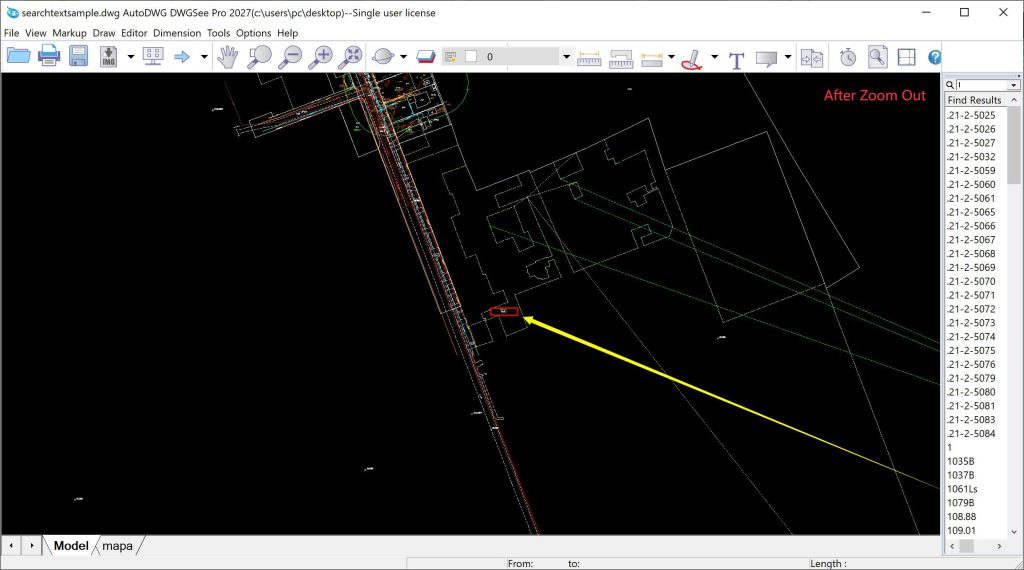
Most CAD viewers can locate target text via keyword search. However, on large architectural, municipal or mechanical assembly drawings, the positioned marker only works in the zoomed-in view. Once users zoom out to check the overall layout or surrounding details, the anchor point disappears or becomes unrecognizable. The located position is lost, making the search result practically useless and forcing repeated searches and view adjustments.
DWGSee’s Original Solution: Persistent Anchor Tracking
DWGSee’s latest exclusive update solves this exact problem with a one-of-a-kind persistent search tracking technology.
After you locate text with DWGSee’s search tool, the software permanently locks the positioning anchor. No matter how you zoom out, zoom in, or pan the drawing, the target position stays continuously tracked and visible. Even on extra-large drawings, you can always identify the searched text without re-searching.
Key Benefits
This innovative feature eliminates repetitive search operations and view adjustments required by other CAD viewers. It ensures stable, always-visible text positioning across the entire drawing view, significantly boosting efficiency for drawing checking, parameter verification, annotation review and detail comparison tasks.
Summary
Persistent search anchor tracking is a unique DWGSee innovation that fills the functional gap of mainstream CAD viewing software. It makes text search on large drawings precise, stable and truly practical, bringing a more professional and user-friendly CAD viewing experience.