Tired of Re-typing CAD Tables? Convert Line Graphics to Native Tables with DWGSeeCAD
Working with CAD drawings always comes with hidden productivity killers—and one of the most frustrating is broken non-standard tables.
Most engineers, drafters, and design professionals have encountered this issue countless times. Many CAD files end up with corrupted table elements due to irregular drawing habits, mismatched templates, or cross-format file conversion. Instead of complete, editable CAD table objects, you only get messy combinations of independent lines and floating text.
On the surface, these graphics look exactly like standard tables. But functionally, they are nothing more than disjointed primitives. You cannot edit them as tables, batch modify data, or export structured information directly. For a long time, the only solution was inefficient and error-prone: manually checking every cell, comparing line by line, and retyping all data into new tables from scratch. It wastes hours of valuable working time and greatly delays project progress.
If you are still suffering from manual table reconstruction in CAD files, DWGSeeCAD brings a one-click fix to end this tedious work.
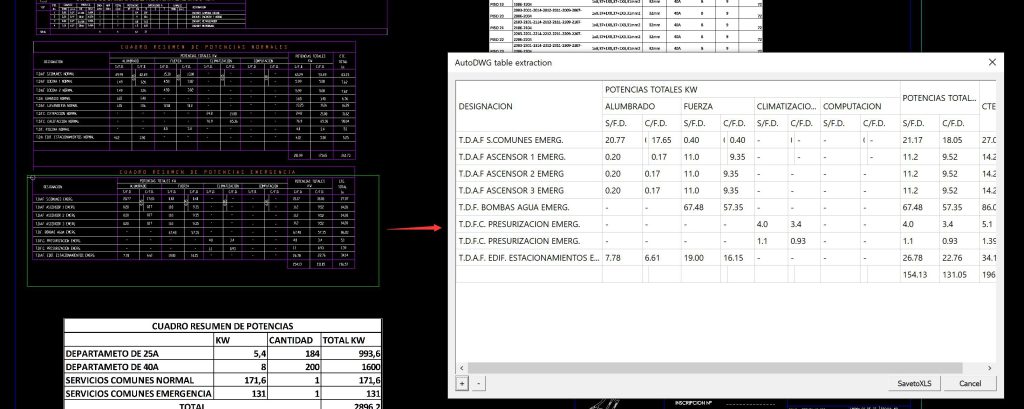
DWGSeeCAD’s exclusive table restoration feature is designed specifically for these line-and-text combined pseudo-tables. It requires no complicated settings or professional technical operations. Simply drag to frame-select the entire irregular table area, and the system will intelligently identify table borders, row and column structures, cell boundaries, and all text content.
Within seconds, the fragmented line graphics will be automatically converted into complete, standard, editable native CAD tables. The generated table highly restores the original drawing style, layout, and data information with zero missing content and zero disordered formatting. After conversion, you can directly edit table content, adjust styles, extract data, and save the new complete table file for subsequent engineering sorting, data statistics, and document delivery.
Why choose DWGSeeCAD for CAD table conversion?
✅ Intelligent recognition for non-standard tables It perfectly adapts to informal drawings, converted files, and template-mismatched graphics, solving the problem of unrecognized broken tables that most CAD tools cannot handle.
✅ No manual rework & zero data error Eliminate repetitive typing and manual proofreading. Intelligent algorithm restoration ensures consistent data and accurate layout, avoiding human errors.
✅ One-click operation & ultra-high efficiency Complex table reconstruction work is compressed into a simple selection operation, helping you finish drawing sorting in minutes and greatly improve office efficiency.
✅ Original style full restoration The generated real table retains the original drawing’s style and specification, fully meeting engineering delivery and document archiving standards.
✅ Batch editing of table cells Once converted into native table objects, you can bulk-modify cell content, adjust row heights, column widths and text formatting. There is no need to move or edit hundreds of individual lines and text blocks one by one.
✅ Direct structured data export Native CAD tables allow direct export of table data to Excel or CSV. Extract BOMs, schedules and quantity lists easily for cost calculation, reporting and external data processing.
✅ Cleaner DWG files and easier drawing audit Pseudo-tables contain a large number of separate primitives that bloat the drawing file. Converting to a single table object reduces entity count, simplifies layer management and lowers the chance of selection mistakes.
✅ Stable printing and PDF export Exploded line-text tables frequently have misaligned text and broken borders during plotting or PDF export. Native tables render reliably, ensuring professional output for tender documents and construction drawings.
✅ Better collaboration and future revisions You can update table values centrally, and share editable tables with teammates or external partners. Native tables also support CAD fields and attributes for linked data updates and drawing validation.
Don’t let messy broken tables drag down your work efficiency. DWGSeeCAD simplifies CAD drawing sorting and data extraction with powerful, lightweight, and practical functions. Turn invalid line graphics into usable standard tables in one second, and make your CAD file arrangement more standardized and efficient!
Try DWGSeeCAD now to optimize your CAD table processing workflow!